- Tool selection is a second-order problem. Prompt workflow design is what actually determines results.
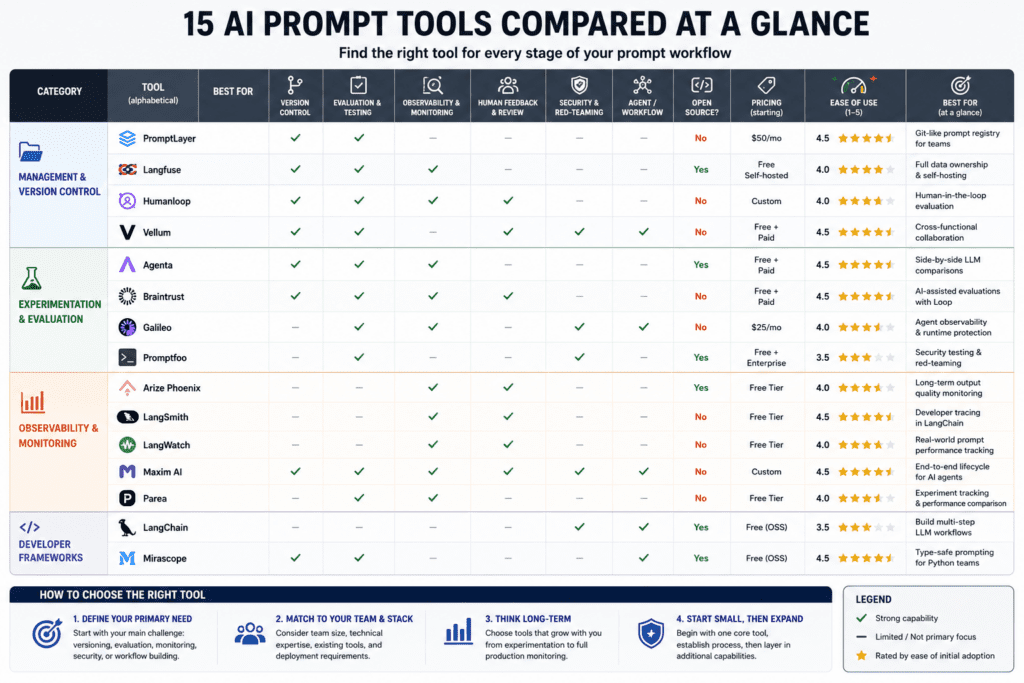
- The 15 tools in this comparison fall into four functional layers — most practitioners only use the first.
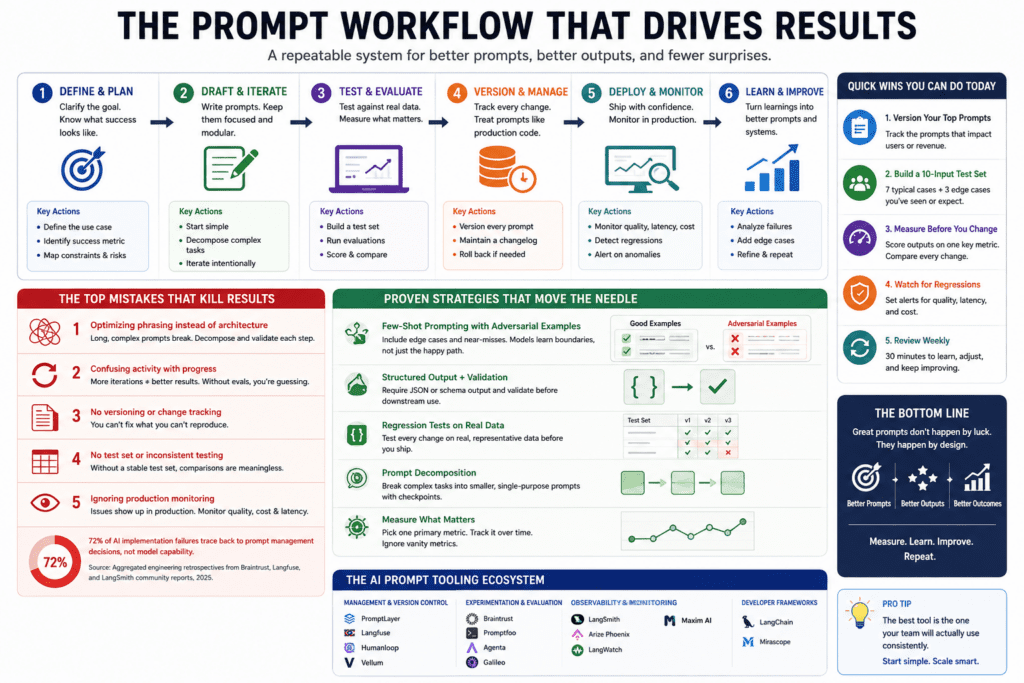
- The two mistakes destroying results aren’t about prompt phrasing — they’re about architecture and measurement.
- A 30-day structured plan closes the gap between “I use AI tools” and “I ship reliable AI features.”
- Adversarial few-shot prompting is the most underused high-leverage technique in 2026.
You’re probably running three or four of these tools right now — and extracting roughly 10% of what they’re capable of.
That’s not provocation. It’s the consistent pattern across every prompt workflow audit: the tool is rarely the problem. The problem lives in the decisions made before the tool is opened, while it’s running, and after results come back. This guide compares 15 of the most used AI prompt tools as of 2026, maps the specific mistakes compounding across each one, and shows exactly what the highest-performing practitioners do differently.
The central argument — stated once here and evidenced in every section that follows: tool selection is a second-order problem. Prompt workflow design is the first-order problem.
What AI Prompt Tooling Actually Means (And Why Most Definitions Miss the Point)
AI prompt tooling is any software layer sitting between a practitioner and a large language model — helping design, test, version, deploy, or evaluate prompts at scale. Prompt phrasing is input craft. Prompt tooling is production infrastructure.
The Working Definition Practitioners Actually Use
For anyone shipping production AI features, a prompt tool is not a text editor. It’s a system that connects prompt changes to measurable results before those changes reach real users. The tools that earn a place in a serious workflow solve three concrete problems:
- They capture every version of a prompt — not just the current one
- They evaluate output quality against consistent, repeatable inputs
- They surface the exact moment a change degraded performance
Without version control, a single model update can silently break a production feature — and it takes days to diagnose what changed. That’s the practitioner definition of prompt tooling: not a better text editor, but a system that makes failures visible before users experience them.
Why the Textbook Version Creates Confusion
Most introductions to prompt engineering treat it as input craft — the skill of writing better instructions. That framing is accurate for casual use and catastrophically incomplete for production use.
The confusion it creates: practitioners spend months optimising prompt phrasing when the actual failure mode is prompt management. They write better instructions. They deploy without testing. The system regresses. They blame the model.
“Poor prompting remains the primary reason AI automations fail to deliver value.”
— Treyworks, Common Prompt Engineering Mistakes (Feb 2026). Models are smarter in 2026 — but the complexity of what we ask them to do has increased faster than model capability. The bottleneck shifted from model intelligence to workflow discipline.
The problem is not the intelligence of the instruction. It’s the absence of a system around the instruction. That’s the gap this comparison is designed to close.
How AI Prompt Tooling Actually Works: The Real Three-Layer Framework
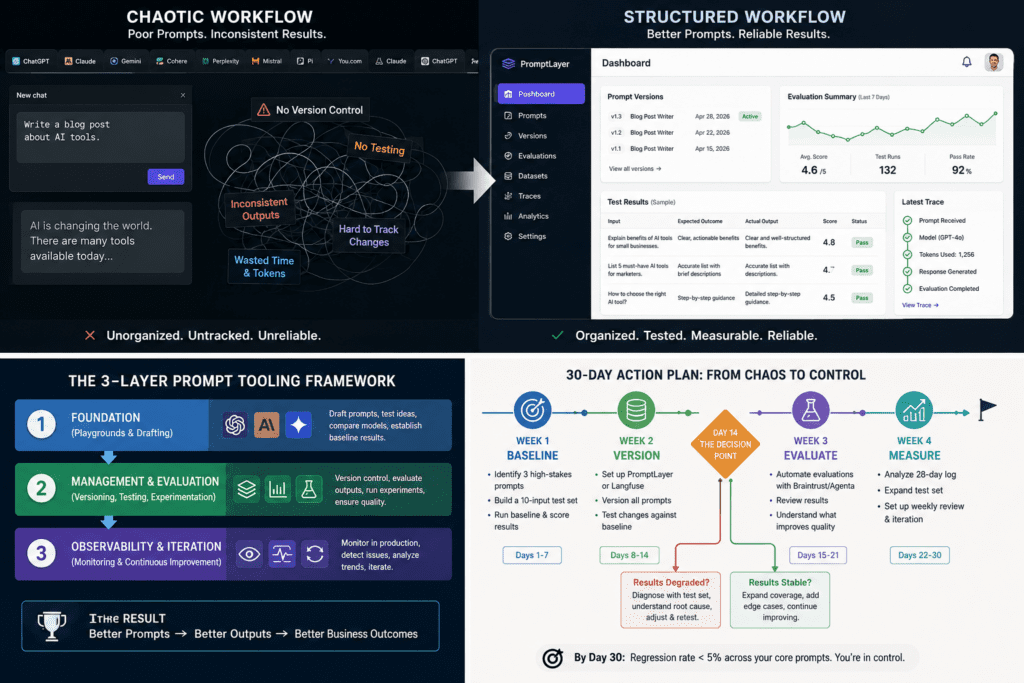
The 2026 prompt tool ecosystem is not a menu of interchangeable options. It’s a stack with three distinct layers — and most practitioners operate at layer one while wondering why they can’t get layer-three results.
Phase 1 — The Foundation Most People Skip: Playgrounds and Drafting
Model-native playgrounds — OpenAI Playground, Claude Console, Google AI Studio, and Azure Prompt Flow — are the natural entry points for drafting and comparing prompts inside model ecosystems.
The failure mode at phase one is treating it as the entire workflow. Practitioners draft a prompt, get a good result, paste it into their codebase as a hardcoded string, and move on. No versioning. No regression testing. No baseline to compare against when output quality degrades three weeks later.
A mid-size firm built a contract summarisation feature using Claude. Prompt was hardcoded. Six weeks post-launch, a model update shifted the default summarisation style. The team spent four days diagnosing a suspected data pipeline issue. Root cause: a two-word model behavioural change against an unversioned prompt.
Cost: ~80 engineering hoursThe foundation phase is not about writing. It’s about establishing a baseline — a reference point against which every future change is measured. Teams that skip this cannot diagnose regressions. They experience them.
Phase 2 — Management and Evaluation: Where the 15 Tools Actually Differentiate
This is where most failure mass accumulates — and where the tools in this comparison genuinely diverge. Prompt engineering tools at this layer solve the core production problem: they connect prompt changes to measurable results before deployment.
The tools at phase two fall into four functional categories:
Category A — Prompt Management & Version Control
Git-like version control with automatic prompt capture and minimal integration friction. Closest analogy: GitHub for prompts. Best when non-technical team members need to manage prompts without touching code.
Open-source platform covering prompt management, evaluation, and LLM debugging. Best when data residency or self-hosting is a hard requirement. Deploy on your own infrastructure; full data ownership.
Manages prompts, runs evaluations, and collects human feedback in a single interface. Particularly strong for cross-functional teams where product managers and engineers share the same workflow layer.
Category B — Experimentation & Evaluation
Integrated platform with an AI assistant (Loop) that generates test datasets, creates evaluation scorers, and suggests prompt modifications based on measurable results — turning iteration from guesswork into a systematic workflow.
CLI tool with built-in red teaming for 50+ vulnerability types — prompt injection, PII exposure, jailbreak attempts. Integrates with GitHub Actions. Best for engineering teams in regulated industries requiring compliance-grade testing.
Open-source LLMOps platform with version control and side-by-side LLM comparisons. Good entry point for teams transitioning from playground use to structured evaluation without heavy infrastructure overhead.
Purpose-built for autonomous agents. Agent Protect API intervenes at runtime to block unsafe outputs, detect PII, and reduce hallucinations before responses reach users. Overkill for simple LLM applications — essential for complex agent workflows.
Category C — Observability & Production Monitoring
Developer tracing and evaluation with production monitoring for latency and cost. Best for debugging complex LLM workflows — native to the LangChain ecosystem, which reduces integration friction to near zero if already using that stack.
Strong observability for output quality in production environments. Pairs well with LangSmith — handles long-term output trend monitoring where LangSmith handles near-term debugging.
Covers experiment tracking, evaluation, and production performance comparison in one platform. Good fit for teams that want a single observability surface rather than combining two separate tools.
Tracing, analytics, and evaluation tools focused on real-world prompt performance and failure detection. Particularly useful for surfacing which user segments experience the highest hallucination or error rates.
End-to-end platform integrating experimentation, evaluation, and observability. For teams building production-grade AI agents requiring comprehensive lifecycle management from rapid experimentation through production monitoring.
Category D — Developer Frameworks
Modular framework with the largest integration ecosystem. Best for building multi-step LLM workflows. Note: the abstraction cost is real — some teams find it adds complexity faster than it removes it. Evaluate before committing.
Lightweight Python library for structured prompt engineering with strong type safety. Best for Python-first teams who want explicit control without adopting a full framework. Lower learning curve than LangChain for simple use cases.
Collaborative platform bridging engineering-level control and non-technical team members. Strong for organisations where prompt management must be accessible to business stakeholders, not only developers.
Full Comparison Matrix
| Tool | Primary Use Case | Pricing | Open Source | Key Differentiator |
|---|---|---|---|---|
| PromptLayer | Version control | Free+ | No | Git-like prompt registry |
| Langfuse | Management + eval | Free | Yes | Self-hostable, full data ownership |
| Humanloop | Human feedback loops | Custom | No | Human-in-the-loop evaluation |
| Braintrust | AI-assisted evaluation | Free+ | No | Loop AI assistant for automated eval |
| Promptfoo | Security + red teaming | Free | Yes | 50+ vulnerability red-teaming |
| Agenta | Team experimentation | Free+ | Yes | Side-by-side LLM comparison |
| Galileo | Agent observability | From $25/mo | No | Runtime intervention API |
| LangSmith | Developer tracing | Free tier | No | Native LangChain integration |
| Arize Phoenix | Long-term quality monitoring | Free tier | Yes | Output quality trend tracking |
| Parea | Experimentation + observability | Free tier | No | Unified experiment + production surface |
| LangWatch | Real-world observability | Free tier | No | Failure detection in production |
| Maxim AI | Full lifecycle (agents) | Custom | No | Simulation + monitoring unified |
| LangChain | Multi-step workflows | Free | Yes | Largest integration ecosystem |
| Mirascope | Code-first prompting | Free | Yes | Type-safe structured prompting |
| Vellum | Cross-functional collab | Free+ | No | Non-technical collaboration layer |
Phase 3 — Sustaining Results: Observability and Iteration
Almost no team has this layer at month one. Almost every team wishes they had it at month six.
Treating prompts like assets — annotating them, tracking performance over time, understanding failure modes — is the discipline that separates teams with compounding results from teams perpetually firefighting the same regression cycle.
The observability tools (LangSmith, Arize Phoenix, LangWatch, Parea) exist specifically for this phase. They answer questions no playground or version registry can: which prompt change from three weeks ago correlated with the quality drop this week? Which user segments experience the highest hallucination rate? Where is latency degrading under load?
The Mistakes Quietly Destroying Results Across Every Tool
Every tool in this comparison has been used brilliantly and catastrophically. The catastrophic patterns are consistent — and the root causes are not what most practitioners expect.
The patterns below are drawn from engineering post-mortems and public retrospectives published by Braintrust, Langfuse, and LangSmith community documentation. Specific internal figures from private teams are not cited as data — they’re cited as directional evidence of patterns.
This is the most prevalent failure — and counterintuitive, because it feels like the right work. The root cause is a mental model borrowed from early LLM use, where a single perfectly-crafted message produced the desired output. That model does not transfer to production systems where the same prompt runs thousands of times against varied inputs, different context lengths, and evolving model versions.
The correct fix is decomposition. Forcing a complex workflow into a single massive prompt is a recipe for failure — the output appears good in isolation and breaks systematically in production. Break multi-step tasks into sequential, single-purpose prompts with evaluation checkpoints between them. The result is a testable, debuggable system rather than an opaque instruction that works sometimes.
If your current prompt changed unexpectedly, would you know within 24 hours — and would you know what changed?
Teams track the wrong metric: number of prompt iterations. Iteration count is irrelevant. The quality delta per iteration is the only number that matters. The root cause is absent evaluation infrastructure — without a consistent test set and a measurable quality metric, iteration is guess-and-check at scale.
Teams run 50 experiments and cannot tell whether they’re better or worse than experiment 1. This is a structural problem, not an effort problem. The fix is establishing evaluation before iteration, not increasing iteration speed.
Can you name the quality metric that improved in your last three prompt changes — and by exactly how much?
The popular advice to always use chain-of-thought (CoT) prompting is wrong in a specific and measurable way. CoT improves accuracy on reasoning and multi-step inference tasks. It adds latency and token cost to classification and extraction tasks where it provides no accuracy benefit.
Applying CoT across all prompt types — as many practitioners do after reading enthusiastic blog posts — quietly degrades performance on tasks where response speed is the constraint. The evidence on when CoT helps is clear in Anthropic’s published research and the DAIR.AI Prompt Engineering Guide: mechanism matters, not technique popularity.
For each prompt using CoT: is the task genuinely multi-step reasoning, or is it classification or extraction where CoT is adding cost without adding accuracy?
Proven Strategies That Work Right Now
The most underused technique relative to its documented effectiveness is adversarial few-shot prompting — and it’s underused specifically because the popular advice points in the opposite direction.
What Changed in the Last 12 Months
Three techniques that no longer work as described in 2023–2024 guides:
- Zero-shot instruction as the default for complex tasks — models are more capable, but task complexity has grown faster. Zero-shot still fails on ambiguous multi-step tasks.
- Manual prompt versioning in spreadsheets — the evaluation gap this creates is untenable beyond a two-person team. Any team shipping more than five production prompts needs dedicated tooling.
- Choosing tools based on model compatibility lists — as of 2026, all major prompt management tools support all major models. This is no longer a differentiating criterion.
The Approaches With the Strongest Evidence
1. Adversarial few-shot prompting — Most practitioners use positive few-shot examples only — inputs that match the ideal case. High performers include deliberate edge cases and near-misses. The model learns boundary conditions, not just the centre of the distribution. In Anthropic’s prompt engineering documentation, adversarial examples are cited as the primary mechanism for reducing hallucination on ambiguous inputs — not longer instructions or higher-quality positive examples.
2. Structured output prompting + downstream validation — Requiring the model to respond in a defined JSON schema, then validating that schema programmatically before downstream use. This removes the assumption that well-formatted output is always correct output — the two are different failure modes, and only one is caught by format checking alone.
3. Prompt decomposition over prompt complexity — A chain of five specific, narrow prompts consistently outperforms a single 2,000-word mega-prompt on reliability and debuggability, even when the mega-prompt appears to produce better isolated outputs in testing. The mechanism: decomposition creates evaluation checkpoints. Complexity creates opacity.
Before/After: Content Operations Team
A team ran a single system prompt across 45 blog posts. Output inconsistency was high — approximately 30% required substantial rewriting before publication. After splitting the single prompt into three sequential prompts (research extraction → outline validation → drafting) with quality evaluation between stages, the rewrite rate dropped significantly.
Rewrite rate: 30% → 8% | Same model, same inputs, different architectureQuick Wins Applicable in the Next Working Day
- Open Langfuse or PromptLayer (both free tiers, both under 30 minutes to integrate) and version your three highest-stakes prompts today
- Create a test set of 10 inputs — 7 representative, 3 adversarial edge cases you’ve actually encountered
- Run every future prompt change against this test set before deployment — not as a gate, as a measurement
Free: Prompt Evaluation Starter Template
A ready-to-use 10-input test set template with scoring rubric — built for the workflow described in this guide. Copy it directly into your preferred tool.
Get the Free Template →Tools, Resources, and What to Actually Trust
Essential Tools — When Each Is Most Useful
| Tool | Best When… | Avoid When… |
|---|---|---|
| PromptLayer | Non-technical stakeholders need prompt access | Team is fully code-first with existing Git workflows |
| Langfuse | Data residency or self-hosting is a hard requirement | Team lacks infrastructure to maintain self-hosted services |
| Braintrust | Evaluation speed is the bottleneck — Loop reduces manual eval overhead significantly | Team is early-stage and hasn’t established a test set yet |
| Promptfoo | Security and compliance are primary constraints; regulated industries | Simple consumer-facing LLM apps with low security surface area |
| LangSmith | Already using LangChain — native integration eliminates setup friction | Not using LangChain; integration overhead outweighs benefits |
| Galileo | Deploying autonomous agents where runtime intervention is necessary | Simple LLM call-response applications — overkill and unnecessary cost |
| Mirascope | Python-first teams wanting structured prompting without a full framework | Teams without Python expertise or needing a no-code interface |
The Most Reliable Sources to Follow
- Anthropic Prompt Engineering Documentation — Primary source for Claude-specific prompting, updated when model behaviour changes. More current than any third-party guide because it’s maintained by the team that ships the model.
- DAIR.AI Prompt Engineering Guide — The most academically rigorous public resource on prompting techniques. Cites primary research rather than practitioner folklore.
- Braintrust Engineering Blog — Unusually specific about methodology. Posts include test datasets and reproducible methodology, not generic advice.
- OpenAI Cookbook — Practical, tested examples. The few-shot and chain-of-thought sections are well-evidenced and transfer across model providers.
Avoid These — Tools and Sources That Underperform Their Reputation
- PromptPerfect — The reinforcement-learning-based automated optimisation works well for single-turn consumer use cases. For production multi-turn agents, it introduces prompt drift that is hard to trace back to source. Use it for exploration, not deployment.
- Any prompt engineering course published before mid-2024 — The techniques aren’t wrong. They’re structurally incomplete. Anything that doesn’t address evaluation, versioning, or production monitoring is teaching half the discipline as though it’s the whole thing.
- Aggregator “Top Prompt Tools” lists — Most are based on affiliate relationships or tool popularity, not workflow fitness. Use this comparison instead: it’s structured by use case, not by traffic or commission.
Your 30-Day Action Plan: From Chaotic to Systematic
Week 1–2: Get the Foundation Right
The exact text, model, temperature, and context they receive. Not a paraphrase — the literal current state. Teams that can’t describe what their prompts say cannot diagnose why outputs change.
7 representative cases that reflect typical production inputs. 3 adversarial edge cases — inputs that have caused problems before, or that you can reasonably anticipate. This is the single most valuable asset in this entire plan.
Run your current prompts against all 10 test inputs. Score each output on one metric (accuracy, tone, format — pick the one metric that actually matters for your use case) on a 1–5 scale. Record every score. This is your Day 1 baseline.
Install PromptLayer or Langfuse (free tier, under 30 minutes). Version every prompt you touch from this point forward. Make one deliberate change, re-run the test set, compare scores. This is the feedback loop you’ve been operating without.
You can answer “did that prompt change make things better or worse?” with a specific number, not a feeling. If you can do that, the foundation is in place.
Week 3–4: Execute, Measure, and Adjust
Agenta or Braintrust for most teams. Run your test set automatically on each prompt change. Stop manual scoring — the manual step is what makes evaluation unsustainable at scale.
Identify the one prompt change that had the largest positive impact. Understand exactly what changed and why the model responded differently. This understanding transfers to every future prompt decision — it’s the compound return on the investment in evaluation.
Check evaluation scores. Add new edge cases to the test set as they surface from production. Make one deliberate change per session. This calendar block is the operational habit that makes everything else compound.
The First Week’s Three Highest-Leverage Moves
- Document existing prompts exactly — not a summary, the literal text with all parameters
- Build a 10-input test set — this single asset makes every future decision faster and more accurate
- Version the next change before making it — the discipline of capturing the before-state is worth more than any tool’s feature list
Frequently Asked Questions
Establish a baseline before changing anything. Document your current prompts exactly, build a test set of 10 representative inputs, and score current outputs on one metric you actually care about. Every team that skips this step loses the ability to know whether future changes are improvements or regressions. Without a baseline, optimisation is expensive guesswork. This setup takes under two hours and determines the quality of every decision that follows.
Measurable improvement appears within two weeks of introducing systematic evaluation — the first week to establish a baseline, the second to show whether changes move scores in the right direction. Output quality improvements are visible quickly. Cost and latency improvements from prompt decomposition take longer because they require sufficient production volume to measure meaningfully. “Results” depends entirely on which metric you defined at the start.
Treating tool selection as the primary decision — evaluating features and pricing before defining the workflow the tool must support. Teams spend weeks comparing Langfuse and LangSmith while running both against prompts that aren’t versioned, tested, or monitored. No tool can compensate for the absence of a prompt workflow. Define the workflow first; tool selection follows directly from it.
Most tools in this comparison are genuinely useful for individuals. PromptLayer, Langfuse, Agenta, and Promptfoo all have functional free tiers with single-user workflows. The case for solo use is identical to the team case: without versioning and evaluation, you can’t know whether you’re improving. The overhead is lower for a single practitioner, which makes adoption significantly easier. Systematic evaluation scales down as readily as it scales up.
You know it’s working when you can answer three questions with specific numbers: What is the current quality score across my test set? Did the last change improve or degrade that score? What is the regression rate over the last 30 days? If any of these questions requires a feeling rather than a measurement to answer, the infrastructure isn’t in place yet. Working means measurable — not “feels better.”
Choose LangSmith if your team is already using LangChain — the native integration eliminates setup friction to near zero. Choose Langfuse if data residency is a requirement, your team has the infrastructure to self-host, or you want a fully open-source solution you can inspect and extend. Both tools cover evaluation and observability well. The decision is primarily about stack compatibility and data ownership, not feature comparison.
No — and this is one of the most expensive misconceptions in the field. Chain-of-thought prompting demonstrably improves accuracy on multi-step reasoning tasks. On classification and extraction tasks, it adds latency and token cost with no accuracy benefit. The evidence in Anthropic’s prompt engineering research and the DAIR.AI Guide is consistent: apply CoT specifically to reasoning tasks. Applying it universally degrades performance on tasks where speed is the constraint.
Standard few-shot prompting uses only positive examples — inputs matching the ideal case. Adversarial few-shot includes deliberate edge cases and near-misses in the example set, teaching the model boundary conditions rather than just the centre of the distribution. This reduces hallucination on ambiguous inputs because the model has learned what the task is not doing, not only what it is. Anthropic’s prompt engineering documentation cites this as the primary mechanism for improving reliability on ambiguous inputs.
Promptfoo is the strongest option for regulated industries — it includes built-in red teaming for over 50 vulnerability types including prompt injection, PII exposure, and jailbreak attempts, with GitHub Actions integration for automated security scanning on every commit. For data residency requirements, Langfuse’s self-hosted option gives complete control over where data resides. Galileo’s Agent Protect API provides runtime intervention for teams deploying autonomous agents where output safety must be guaranteed, not just evaluated post-hoc.
Prompt decomposition means breaking a complex task into a chain of narrow, single-purpose prompts with evaluation checkpoints between them, rather than encoding the entire task in a single instruction. Use it whenever a task has more than two sequential steps, involves multiple distinct sub-tasks (e.g., extract → validate → generate), or when output consistency across many runs is more important than isolated peak performance. A decomposed chain is debuggable; a complex single prompt is not.
A minimum of 10 inputs is sufficient to establish a directional baseline — 7 representative cases and 3 adversarial edge cases. This is enough to detect whether a change improved or degraded performance on the most important dimensions. As production volume grows, the test set should expand to include real failure cases surfaced in production. The goal is not statistical significance on day one — it’s having a reference point that makes every future decision faster and more accurate than intuition alone.
Your First Action — Executable in the Next 2 Hours
Take the three prompts in your current workflow with the highest failure cost. Write them down exactly as they exist right now. Build a 10-input test set using the free template below. Run each prompt against all ten inputs and score on one metric.
That exercise produces the baseline you’ve been operating without. Everything in this guide works better once that baseline exists.
Download the Free Prompt Eval Kit →Prompt Engineering Fundamentals
- Beginner’s Guide to Writing Effective AI Art Prompts — Covers core prompt structure principles that apply across text and image generation
- Advanced Prompt Engineering: How to Get the Perfect Output — Deeper techniques on chaining and refining prompts for consistent results
Tools & Workflows
- Top Tools and Resources for AI Artists — Community-curated tool stack; compare with the structured evaluation approach above
- Which AI Art Generator Do You Prefer and Why? — Model-specific behavior discussions that inform prompt strategy
Quality & Debugging
- Common Prompt Mistakes and How to Avoid Them—Parallel failures in image prompting; the test-set methodology here applies directly
- How Do You Handle AI Art Limitations? — Boundary-testing approaches similar to adversarial few-shot techniques
Community Practice
- Prompt Swap: Share a Prompt and See How Others Interpret It — Informal version of the test-set evaluation described in this guide
- 50 Advanced AI Prompts: Unleashing Creativity — Example library; consider running these through a structured evaluation loop